Introduction
So… how do Astro and other frameworks play along?
Very well, actually. Astro is framework-agnostic by default. If you don’t tell it otherwise, it will render plain HTML and CSS, relying on its Island Architecture to add interactivity only where and when it’s needed.
For this post, we’ll build a classic To-Do component in multiple frameworks and display them on the same page, while keeping the HTML consistent for easy comparison. The main goal is to demonstrate how you can mix frameworks when your use case requires it.
Adding React
At first, I worried that integrating React would require a full React project setup, but it’s much simpler than I expected.
First, install the necessary packages:
npm install @astrojs/react react react-dom
Then add React as an integration in astro.config.mjs:
import { defineConfig } from 'astro/config';
import react from '@astrojs/react';

export default defineConfig({
  integrations: [
    react(),
  ],
});
Now React components can be used inside Astro.
Tip: Give each framework its own folder to keep your project organized.
Here’s the classic ToDo component in React:
import { useState } from "react";
type Todo = {
text: string;
done: boolean;
};
export default function Todo() {
const [items, setItems] = useState<Todo[]>([]),
[text, setText] = useState("");
function addItem() {
if (!text.trim()) return;
setItems([...items, { text, done: false }]);
setText("");
}
function toggleItem(index: number) {
setItems(items.map((item, i) =>
i === index ? { ...item, done: !item.done } : item
));
}
return (
<div className="react__todo todo__demo">
<p>ToDo list:</p>
<input
value={text}
onChange={e => setText(e.target.value)}
onKeyDown={e => e.key === "Enter" && addItem()}
placeholder="Add todo and hit enter…"
className="add__todo"
/>
<ul className="todo__list">
{items.map((item, i) => (
<li
key={i}
onClick={() => toggleItem(i)}
className="todo">
<input
type="checkbox"
checked={item.done}
className="todo__done"
/>
<span
className="todo__task">
{item.text}
</span>
</li>
))}
</ul>
</div>
);
}
To render it in Astro:
---
import React__ToDo from '@components/React/Todo.tsx';
---
<section>
...
/* side-note: no hydration directive set yet */
<React__ToDo />
...
</section>
Island Architecture:
The Island Architecture pattern means each interactive component (island) is isolated: it only brings its JavaScript and state when needed, instead of shipping all scripts for the entire page upfront.
In Astro, this works by rendering static HTML/CSS by default, and hydrating dynamic components like React only when necessary.
Using the client:visible directive, scripts load when the component enters the viewport, avoiding unnecessary data loading.
Here we have our component without the directive (so no interactivity):
Let’s set client:visible and see what that does:
<React__ToDo client:visible/>
Now try it out and add a todo:
We use the client:visible here, but check the Astro docs for the other options for the one that suits your use case, like client:idle, client:load or client:only="react".
client:visible results in the browser, loading the necessary scripts the moment the component enters the viewport. This reduces unnecessary data loading as long as the component is not visible (and usable).
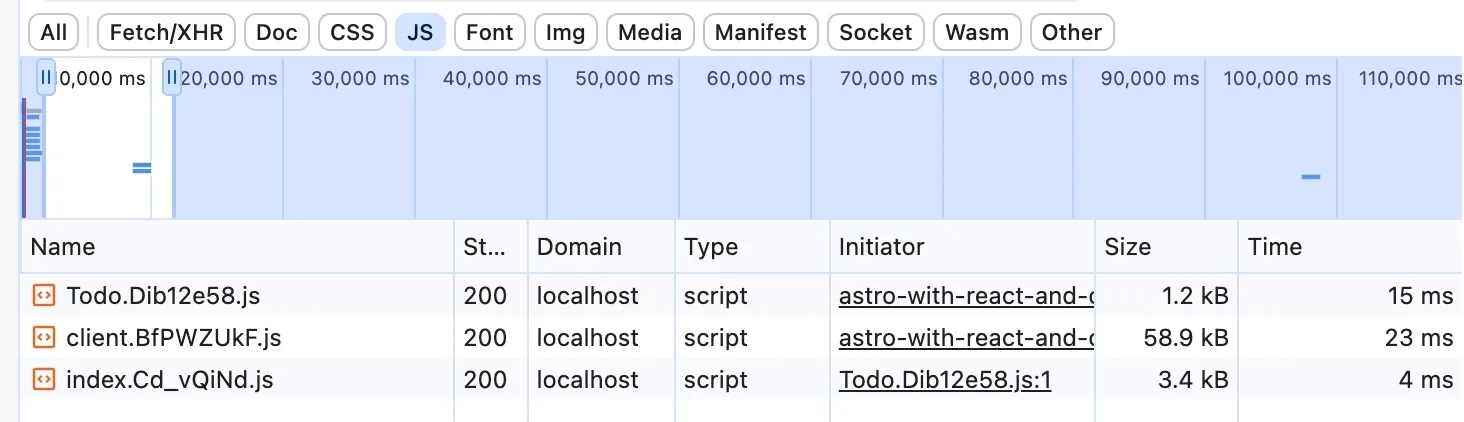
If you open your network-tab, you will find the scripts that were fetched. In this case, for a React component, the biggest one is almost 60KB.
That file contains the React runtime, and it will be loaded just once.
So if you have multiple components (or islands if you like), the runtime will not be loaded again, but ships with the first one.
Adding Svelte
Install the Svelte packages:
npm install @astrojs/svelte svelte
Add Svelte to your integrations:
import { defineConfig } from 'astro/config';
import react from '@astrojs/react';
import svelte from '@astrojs/svelte';

export default defineConfig({
  integrations: [
    react(),
    svelte()
  ],
});
Now we are ready to create our Svelte Todo component:
<script lang="ts">
type Todo = {
text: string;
done: boolean;
};
let items: Todo[] = [];
let text = "";
function addItem() {
if (!text.trim()) return;
items = [...items, { text, done: false }];
text = "";
}
function toggleItem(index: number) {
items = items.map((item, i) =>
i === index ? { ...item, done: !item.done } : item
);
}
</script>
<div class="svelte__todo todo__demo">
<p>ToDo list:</p>
<input
bind:value={text}
on:keydown={(e) => e.key === "Enter" && addItem()}
placeholder="Add todo and hit enter…"
class="add__todo"
/>
<ul class="todo__list">
{#each items as item, i}
<li
class="todo"
on:click={() => toggleItem(i)}
>
<input
type="checkbox"
checked={item.done}
class="todo__done"
/>
<span class="todo__task">
{item.text}
</span>
</li>
{/each}
</ul>
</div>
Let’s test it:
In the Network Tab we see what is loaded to hydrate the Svelte component.
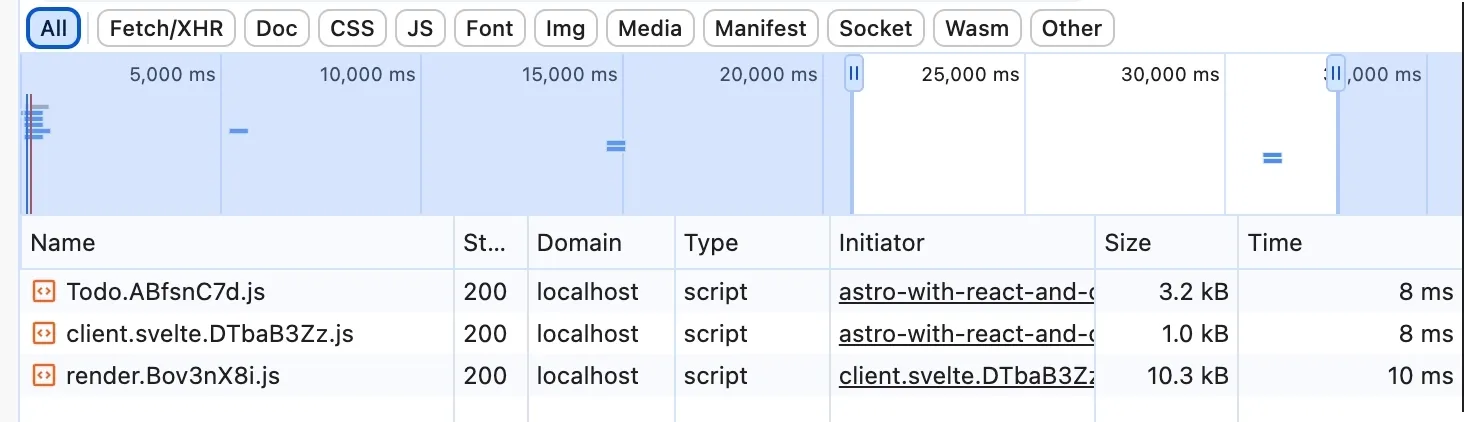
It’s not that big, nice!
We just added two frameworks to our solution without hacks or conflicts, and performance-wise, it works beautifully.
Shall we add just one more?
Adding Vue 3
Same routine. First, install the Vue packages (mind you… Astro requires Vue 3).
npm install @astrojs/vue vue@3
And add the integration:
import { defineConfig } from 'astro/config';
import react from '@astrojs/react';
import svelte from '@astrojs/svelte';
import vue from '@astrojs/vue';

export default defineConfig({
  integrations: [
    react(),
    svelte(),
    vue()
  ],
});
Vue ToDo component:
<script setup lang="ts">
import { ref } from 'vue'

type Todo = { text: string; done: boolean }

const items = ref<Todo[]>([])
const text = ref('')

function addItem() {
  if (!text.value.trim()) return
  items.value.push({ text: text.value, done: false })
  text.value = ''
}

function toggleItem(index: number) {
  items.value[index].done = !items.value[index].done
}
</script>

<template>
  <div class="vue__todo todo__demo">
    <p>Vue ToDo list:</p>
    <input
      v-model="text"
      @keydown.enter="addItem"
      placeholder="Add todo and hit enter…"
      class="add__todo"
    />

    <ul class="todo__list">
      <li
        v-for="(item, i) in items"
        :key="i"
        @click="toggleItem(i)"
        class="todo"
      >
        <input type="checkbox" v-model="item.done" class="todo__done" />
        <span class="todo__task">{{ item.text }}</span>
      </li>
    </ul>
  </div>
</template>
Let’s test it:
And check the Network Tab to see how the size of the loaded scripts.

Framework Comparison
| Framework | Component | Hydration | Client Scripts Size |
|---|
| React | <React__ToDo /> | client:visible | ~65 KB |
| Svelte | <Svelte__ToDo /> | client:visible | ~15 KB |
| Vue 3 | <Vue__ToDo /> | client:visible | ~33 KB |
Notes:
client:visible means the component scripts are loaded only when the component enters the viewport.- Sizes are approximate and depend on your build and tree-shaking.
- Astro itself (static content) remains minimal, even with multiple frameworks.
Awesome, isn’t it? We have 3 components from 3 different frameworks playing along nicely on the same page, and all for about 110kb of scripts. Sweet!
Conclusion
Astro supports more of the major frameworks, but I think that these three are a nice example. I did try Angular (not officially supported), but immediately ran into some issues with CommonJS / ES Modules, so I aborted that plan.
At the moment, Astro officially supports these frameworks:
- React
- Preact
- Vue
- Svelte
- Solid
I found it very easy to integrate them, but of course, a simple todo component doesn’t really challenge the integration limits.
The performance of the rendered page is very nice. There is little to no extra code left behind, and the lazy-loading-like pattern prevents unnecessary data for the client.
And since this article required me to set up my solution for React, Svelte, and Vue, I am going to play some more with it.
Thank you for reading until the end!
I need to work on a comments component, but for now, just use the contact form below if you spotted a mistake or want to leave some feedback.